Why Most CI Teams Don't Have a Hiring Dashboard (and Should)
Competitive intelligence teams track product launches, pricing changes, executive moves, and funding rounds. Most have some form of dashboard or tracking system for these signals. Very few have anything comparable for hiring data.
This is strange, because hiring data is arguably the most reliable strategic signal available. It's public, it's frequent, and it comes with a budget commitment attached. Yet most CI and TA teams still approach hiring intelligence with ad hoc LinkedIn searches and occasional manual career page checks.
The reason is simple: the data is messy. Job titles aren't standardized. Companies use different terminology for the same roles. Postings appear and disappear without warning. Building a clean, comparable dataset requires significant effort.
Here's how to do it anyway.
Step 1: Define Your Competitor Set
Start with 10-15 companies. Not your entire competitive landscape. The companies that matter most for two reasons:
- Product competitors: Companies your sales team encounters in deals. Their hiring tells you about product direction, market focus, and sales strategy.
- Talent competitors: Companies your candidates choose instead of you. These aren't always the same as product competitors. A B2B SaaS startup in Denver might compete for talent with Datadog and Splunk, not just direct product competitors.
The overlap between these two lists is your priority set. If a company appears on both lists, track them first.
Step 2: Choose Your Data Sources
Tier 1: Career Pages (Most Reliable)
Direct career page monitoring is the gold standard. The data is first-party, current, and complete. The challenge is that every company has a different ATS (Greenhouse, Lever, Workday, custom), and each presents data differently.
If you're building this yourself, you'll need scrapers for each ATS format. Greenhouse and Lever have public API endpoints that make this easier. Workday and custom career pages require web scraping, which is more brittle.
Tier 2: Job Board Aggregators
Indeed, LinkedIn, Glassdoor, and ZipRecruiter aggregate postings from multiple sources. They're useful for breadth but have a lag (postings may appear 1-3 days after the career page) and sometimes miss postings that aren't syndicated.
Tier 3: Government Filings
SEC filings include headcount data for public companies (usually quarterly). H1B disclosures from the Department of Labor give you exact salaries for visa-sponsored roles. Both are lagging indicators but useful for validation.
Step 3: Normalize the Data
This is where most DIY efforts die. Raw job posting data is inconsistent. One company calls the role "Software Engineer II," another calls it "Senior Backend Developer," and a third calls it "Platform Engineer." They might all be the same role.
You need a normalization layer that maps raw titles to a standard taxonomy. Start simple: Engineering, Product, Design, Data, Sales, Marketing, Customer Success, Operations, Executive, Other. Within each, add seniority levels: IC Junior, IC Mid, IC Senior, IC Staff+, Manager, Director, VP+.
This normalization is what makes the data comparable across companies. Without it, you're comparing apples to job-posting-shaped oranges.
Step 4: Design Your Dashboard Metrics
The metrics that matter, in priority order:
Primary Metrics (Check Weekly)
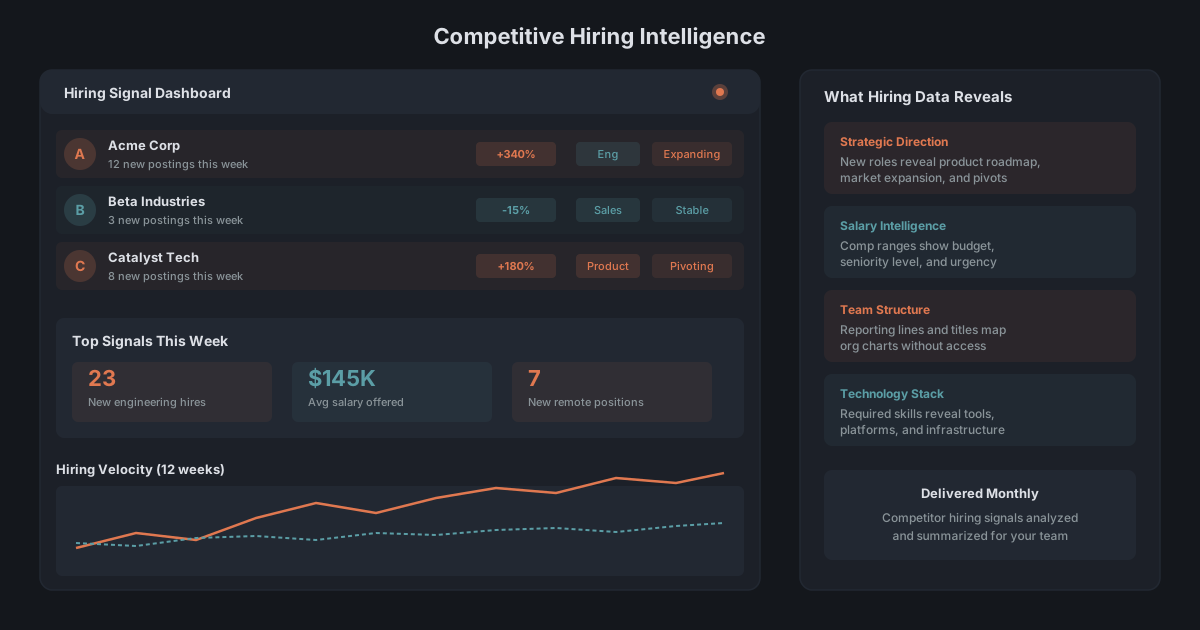
- Open role count by competitor: The basic pulse. Is each competitor growing or shrinking?
- 30-day change in open roles: The velocity signal. A +40% jump demands attention.
- Function mix breakdown: Pie chart or stacked bar showing engineering vs. GTM vs. other for each competitor.
Secondary Metrics (Check Monthly)
- Compensation ranges by benchmark role: Where each competitor falls for your priority roles.
- Geographic distribution: Map view of where competitors are hiring. New pins = new markets.
- Tech stack heatmap: Technologies mentioned in engineering postings, tracked over time.
- Time-to-fill estimate: How long postings stay active. Longer = harder to fill or less urgent.
Strategic Metrics (Check Quarterly)
- Function mix trend: How the engineering-to-sales ratio has shifted over 12 months.
- Comp velocity: Rate of change in salary ranges quarter-over-quarter.
- Net hiring momentum: Postings added minus postings removed. Captures the real growth rate.
Step 5: Visualization and Distribution
The dashboard is useless if nobody looks at it. Design for your audience:
- TA teams want comp data and role-level detail. They need to answer "what's market rate for this role?" in real time.
- CI teams want strategic signals and trend analysis. They need to answer "what is competitor X about to do?"
- Sales leadership wants competitive positioning data. They need to answer "where is competitor X investing, and how do we counter?"
- Executives want the 3-bullet summary. Top 3 signals from the past month, with recommended actions.
Build the full dashboard for CI and TA. Create derivative views (email digests, slide decks) for sales and executives. Fieldwork's monthly reports are designed for this distribution pattern.
Build vs. Buy: The Honest Math
Building this yourself requires:
- Scrapers: 2-3 weeks of engineering time to build. Ongoing maintenance as career pages change formats. Budget 4-8 hours per month for scraper fixes.
- Data pipeline: Storage, normalization, deduplication. Another 2-3 weeks to build properly.
- Dashboard: 1-2 weeks for the visualization layer (Looker, Metabase, custom).
- Maintenance: A conservative 10-15 hours per month once everything is running.
Total: 6-8 weeks of engineering time upfront, plus 10-15 hours per month ongoing. At a blended engineering rate of $150/hour, that's $15K-$20K to build and $1,500-$2,250 per month to maintain.
Compare that to a purpose-built solution. Fieldwork's plans start at a fraction of the DIY engineering cost and include the data collection, normalization, and reporting layer. The math favors buying for most teams, unless you have very specific data requirements that no platform covers.
The companies that build their own hiring dashboards and maintain them long-term tend to be the ones that also build their own CRM and their own analytics platform. If that's your culture, build. If you'd rather spend engineering cycles on your product, buy.
Either way, the competitive hiring dashboard is the missing piece in most CI stacks. When are you going to fill the gap?
Frequently Asked Questions
What should a competitive hiring dashboard track?
Core metrics include: hiring velocity by competitor, function mix, geographic distribution, compensation ranges by role, tech stack mentions, and seniority distribution. The best dashboards also show trend lines and anomaly detection.
What data sources feed a hiring dashboard?
Primary sources: competitor career pages, job board APIs (Indeed, LinkedIn), pay transparency disclosures. Secondary sources: Glassdoor reviews, H1B filings, SEC filings for headcount data. Fieldwork aggregates these into a single structured feed.
How long does it take to build a hiring dashboard from scratch?
A basic version with manual data collection takes 2-3 weeks to set up and 4-6 hours per week to maintain. An automated version with API integrations takes 2-3 months of engineering time and ongoing maintenance for scraper reliability.
Who should own the competitive hiring dashboard?
Joint ownership between Talent Acquisition and Competitive Intelligence works best. TA owns the comp and talent pipeline data. CI owns the strategic analysis layer. Both teams benefit from the same underlying data.
Should I build or buy a competitive hiring dashboard?
Build if you have engineering resources, unique data requirements, and 3+ months of patience. Buy if you need insights within 30 days or if your engineering team is better deployed on product work. Fieldwork is purpose-built for this use case.